How I Livetweeted .NET Conf Without Watching (All of) It
I did something pretty cool last week. I livetweeted .NET Conf.
And when I say I livetweeted .NET Conf, what I really mean is I had an agent watching .NET Conf live, processing the lessons in the talks, and livetweeting summaries on my behalf. All four days. X, Bluesky, and Mastodon.
Spoiler: the biggest post of the week was about WinForms. 26,418 impressions. The .NET 11 launch post got 144.
Why I did it
I really enjoy .NET Conf. I’ve been a career-long .NET developer, and it’s always exciting to watch .NET Conf, see the latest and greatest, and figure out where it’s going to apply in the work I do every day.
The fundamental problem with .NET Conf? It’s a lot of time to devote to a virtual event when I have day job work to do.
I’m sure a lot of you feel this way too. You don’t watch the entire live event. You might watch the keynote and the first or second session, and then you go off and do some other work. You’re not tied to the live stream all day for all four days.
But I still wanted some sort of real-time summary of what was going on. I’ve built various workflows with my AI agents to do this sort of work, so I thought, let me experiment with the .NET Conf live stream.
And then I thought, wouldn’t it be cool if my agent could livetweet it? The lessons learned. The people giving the talks. Maybe a screenshot or two. A virtual note taker for the whole event.
So on Tuesday morning, about an hour before .NET Conf kicked off, I started setting up the environment to see if it would do the work I needed.
How much did I actually watch? Day 2, barely. I had obligations that took me out of the house, so I trusted the agent to do the watching and the livetweeting for me. Judging by the social media notifications on my phone, people were loving the content.
Days 3 and 4, I had it on the TV and passively listened. But like I said, I have a day job, and I spent most of my time getting work done. I wasn’t nearly as attentive as I wanted to be.
As far as I can tell, it didn’t post anything I had to take back.
The pipeline
I didn’t have to do much to get started. Most of the tools were already installed.
The first one was yt-dlp, an open source tool that pulls down YouTube videos and YouTube live streams. This was the key piece, because the live stream was on YouTube. I don’t think I could have done this easily any other way, but yt-dlp made that part extremely simple.
What I hadn’t done before was use it in real time. Normally, when I’m researching videos, I download the whole thing and do the post-processing afterward. I’d never done it against a live stream.
The other two were Whisper and ffmpeg. Whisper is a local transcription model, and I run it on a Mac mini. I didn’t have to pay for a service, because I already had the hardware and the model ready to go. ffmpeg is another open source tool, for video manipulation.
The Python is pretty simple, and to be honest, Claude did most of the work. I told Claude what I wanted to build and which tools I had, and asked if it had any recommendations. It did. Several, on the flow and how to pipe from yt-dlp into ffmpeg into Whisper.
Here’s the whole thing:
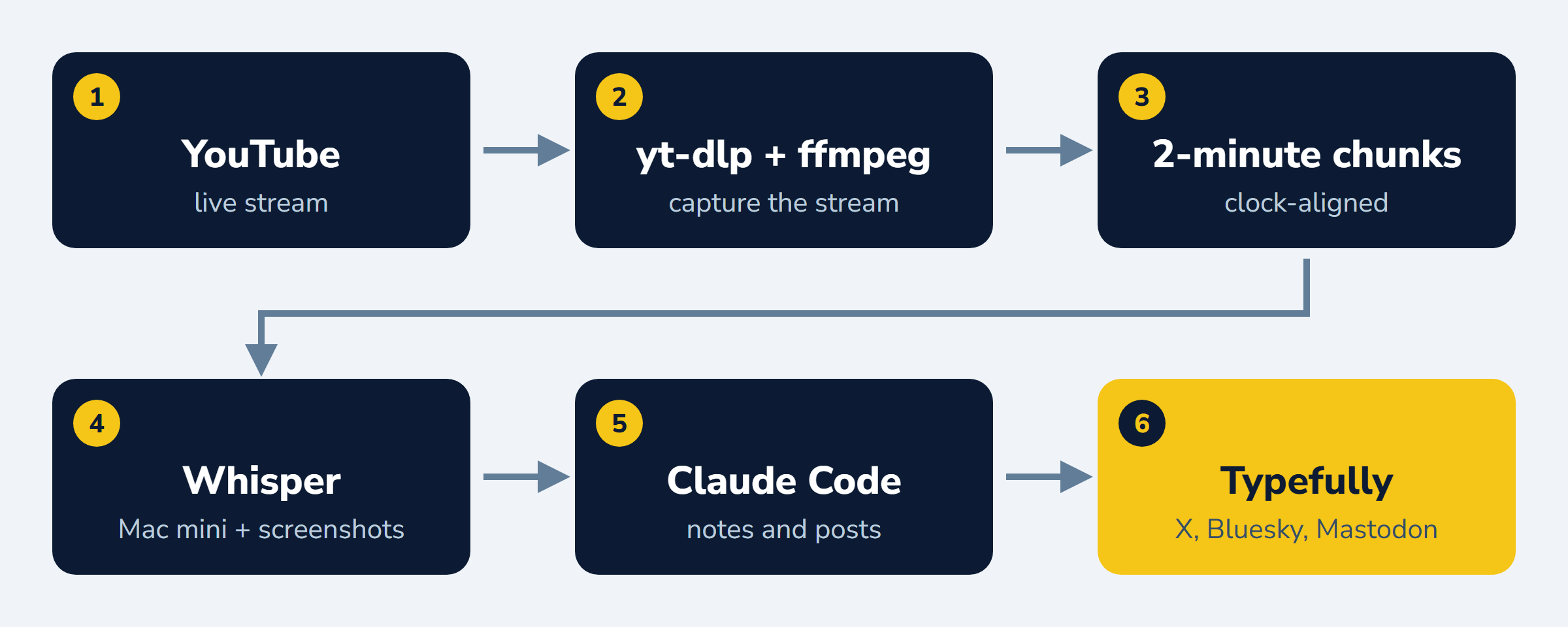
As the live stream ran, we cut it into 2-minute chunks. For every chunk, we grabbed screenshots whenever the screen changed. What was the presenter showing? We tried to pull a little bit of visual context out of the live stream.
Then we compared that with the 2 minutes of transcription to hear what the speaker was talking about. This is the cool part. When you have visual context and audio context, you’re like 99% sure what that 2-minute snippet is about.
Claude Code would come in, look at both sets of context, and figure out, oh, so-and-so is talking about whatever topic. It would do that over a couple of chunks (a little bit of the agent figuring out what was going on), then draft a post on my behalf.
That post went to Typefully, a service I use for social media, and Typefully posted it to my X, Bluesky, and Mastodon accounts.
I didn’t do LinkedIn. LinkedIn isn’t great for short-term posts. It’s better suited for longer ones, so I did a follow-up there a couple of days later with all the content I’d collected.
For the folks who want the nuts and bolts:
- Capture.
yt-dlppulls the YouTube live stream. The--wait-for-videoflag waits through the countdown until the show starts.ffmpegcuts the stream into clock-aligned 2-minute chunks. I picked 2 minutes because I wanted “pseudo real-time.” In practice, the notes ran about 3 minutes behind live, which is close enough for social. - Watcher. A Python script (
tools/process.py) picks up each finished chunk. It pulls the audio and ships it to the Mac mini runningmlx_whisper. It grabs a screenshot when the frame changes (a 160x90 thumbnail diff with at least 15 seconds between shots). It joins chunks into hourly files. Then it logsREADY <chunk>. - Claude Code loop. Claude watches the log for
READYlines. For each chunk it reads the transcript and a contact sheet of that chunk’s screenshots, and opens full-size frames when a slide has numbers on it. It writes per-hour notes, a highlights table, and a recap feed line. If the chunk has a real number, a demo, or a strong take, it writes a post. - Posting. Typefully, through its MCP server, schedules the post to X, Bluesky, and Mastodon with the screenshot attached. Every post is also saved to a JSON queue file and a Solo scratchpad, so I can see what went out.
- End of day. A wrap-up step builds the hour files, a speaker screen-time table, YouTube chapter timestamps, a LinkedIn recap draft (I post that one myself), and a recap kit with highlights, images, and the full transcript.
After Day 1, I had Claude turn the whole process into four project skills: conf-capture, conf-chunk, conf-post, and conf-wrapup.
The rules of the bot
I kicked the bot off, and it successfully posted its first post. Then I added some rules along the way for how it was supposed to post on my behalf.
The big one is my tropes skill. What the tropes skill does is clean up AI-generated content so it doesn’t look like AI-generated content. It reads more like a human actually wrote it. (Which, obviously, a human didn’t.) So the AI writes the post, cleans it up, sends it to Typefully, and goes about its business.
A bot posting under my name all day is a great way to embarrass myself, so there were a few more:
- Hook first, one idea per post. No feature dumps. One emoji, max.
- No invented reactions. I added this one after Day 1, when a couple of posts said things like “my favorite part of C# unions.” Claude doesn’t get to say “my favorite demo” or “I’ve wanted this for years.” I didn’t say those things. I wasn’t watching!
- Accuracy over speed. If a later chunk adds a caveat, Claude edits the scheduled post before it goes out. This came up twice. A speaker made an auth refresh claim and later clarified it was “not real-time.” That post got fixed before it fired. Another speaker showed an AOT size win that turned out to be offset by SDK dedup, but that post was already out, so I left it.
- Space them out. Posts go out at least 5 minutes apart (give or take). Nobody wants 12 posts in a row from me.
- Tag carefully. Tag
@dotnet(never@dotnetconf) and only verified speaker handles. A weak match got the speaker’s name and no tag. - Privacy check on every frame. Demo screens are full of stuff that shouldn’t be on social: user paths, subscription IDs, password vaults, repo names. Those frames got cropped or skipped.
- Don’t ask me questions. More on that one in What broke.
The Community Days got their own format. One “now on” post per session with the speaker, the talk title, and a screenshot of the title slide, and no play-by-play. Claude kept writing full notes for me, but the feed stayed quiet.
Tagging the speakers
I wanted every post to tag the speaker. It’s incredibly important to tag the people doing the real work.
It was also amazing for engagement. A lot of the speakers retweeted or liked the posts. And anyone who found a post through a hashtag or a search could talk directly to the speaker and ask their own questions. That led to a ton of amazing conversations that added to what I learned, and I didn’t even have to ask the questions.
Finding the handles took real work. The bot started from a speaker sheet I built before the conference: name, company, and any handles I already knew. That covered 63 speakers. 34 of them were missing X, Bluesky, or both. None had Mastodon.
Claude filled the gaps one platform at a time:
- Bluesky: the public API (
app.bsky.actor.searchActorsandgetProfile). It checked the bio, the links, and the post count. - Mastodon: the instance account lookup API and WebFinger. For example, Barry Stahl’s address on his own domain resolves through WebFinger to a fosstodon.org account.
- X: no usable API, so Claude in Chrome (browser automation in my signed-in Chrome) opened profiles and ran user searches.
Evidence that counted: the bio names the company or product, the profile links to the speaker’s site or GitHub, the account posts about the talk topic, or an official company account tags them.
Every match got a confidence level. High confidence got a tag. Medium confidence, or a barely used account (no bio, 0 to 2 posts), got the name only. One account posted about Orleans and was followed by the Orleans lead, but it had no bio, so it got the name only.
All of it went into notes/verified-handles.md, the only source Claude was allowed to tag from. The rule was “Do not guess.”
Claude also caught a lot of lookalikes:
@dotnetconfon X is an unrelated Russian-language account. That’s where the “tag@dotnet, never@dotnetconf” rule came from.- Handles that matched a speaker’s name belonged to a Belarusian journalist, a UK musician, a sports account, a NYC photographer, and a Foursquare golf account from 2012.
- Some were empty accounts with the speaker’s exact name. 6 followers, 0 posts.
- Sometimes the right one looks wrong. One speaker is
@paul__usher, with two underscores.
What broke
For the most part, I’m so impressed with how well this worked.
All four live streams were pre-scheduled on YouTube, so I had the URLs up front. Thank goodness. At the end of each day, the capture stopped with the stream. After the wrap-up, a new capture waited for the next day’s stream and got going automatically.
The one place I got caught: Claude Code asked me a question along the way. And when it stops to ask you a question, it stops doing the work. That happened on Day 2. Thankfully, I caught it about 10 minutes later, so I didn’t lose too much. After I answered, I told it: do not ask me any questions. For the rest of the conference, it didn’t. It just did the work I expected it to do.
There were smaller things too, and Claude fixed them as they came up:
- The stream “ended” right as the show started. When the pre-show slate switched to the live show, YouTube threw an error and the capture script decided the stream was over. It now retries the live check 6 times, 20 seconds apart, before it gives up.
- The video froze and the audio kept going. On Day 3, ffmpeg stopped getting video frames for about 24 minutes, so no chunks came through. A stall watcher now flags it when the newest chunk is more than 4 minutes old.
- One hour didn’t get joined. Restarting the capture reset the list of finished chunks, so one hour never got joined into its hourly file. Claude joined it by hand, and the watcher now scans the chunk files on disk as well as that list.
- Whisper hallucinates on music. During intros, it loves to transcribe “Thank you.” over and over. Those lines get marked and never quoted.
- Screenshot dedupe misses things. A text-only slide change or a static code demo doesn’t move the thumbnail diff enough. Claude pulled those frames by hand.
- Speakers correct themselves. Somebody says a thing at minute 10 and walks it back at minute 14. That’s why scheduled posts got rechecked against the next chunk.
How it landed
On top of the Claude Code instance doing the capture and the livetweeting, I had my Grok bot monitoring social media on my behalf. It watched all the posts and told me how each one was doing.
The biggest win of this whole experiment was that livetweeting individual takes during sessions turned out to be a huge indicator of what people liked and what they didn’t.
What I probably would’ve thought were the wins early on turned out not to be the things people cared about most. And the things I didn’t think anyone would care about turned out to be the biggest wins. It’s kind of amazing how this community works. Here’s what that looked like.
Over four days, the bot published 176 posts. On X alone, they picked up 103,116 impressions, 1,123 likes, 397 bookmarks, and 119 replies.
| Metric | Day 1 | Day 2 | Day 3 | Day 4 |
|---|---|---|---|---|
| Posts published | 57 | 80 | 20 | 19 |
| X impressions | 59,309 | 33,236 | 5,777 | 4,794 |
| X likes | 527 | 414 | 103 | 79 |
Days 3 and 4 were Community Days. Fewer posts, quieter numbers.
This part surprised me. The median post got about 170 impressions, but four posts pulled in nearly half of all impressions.
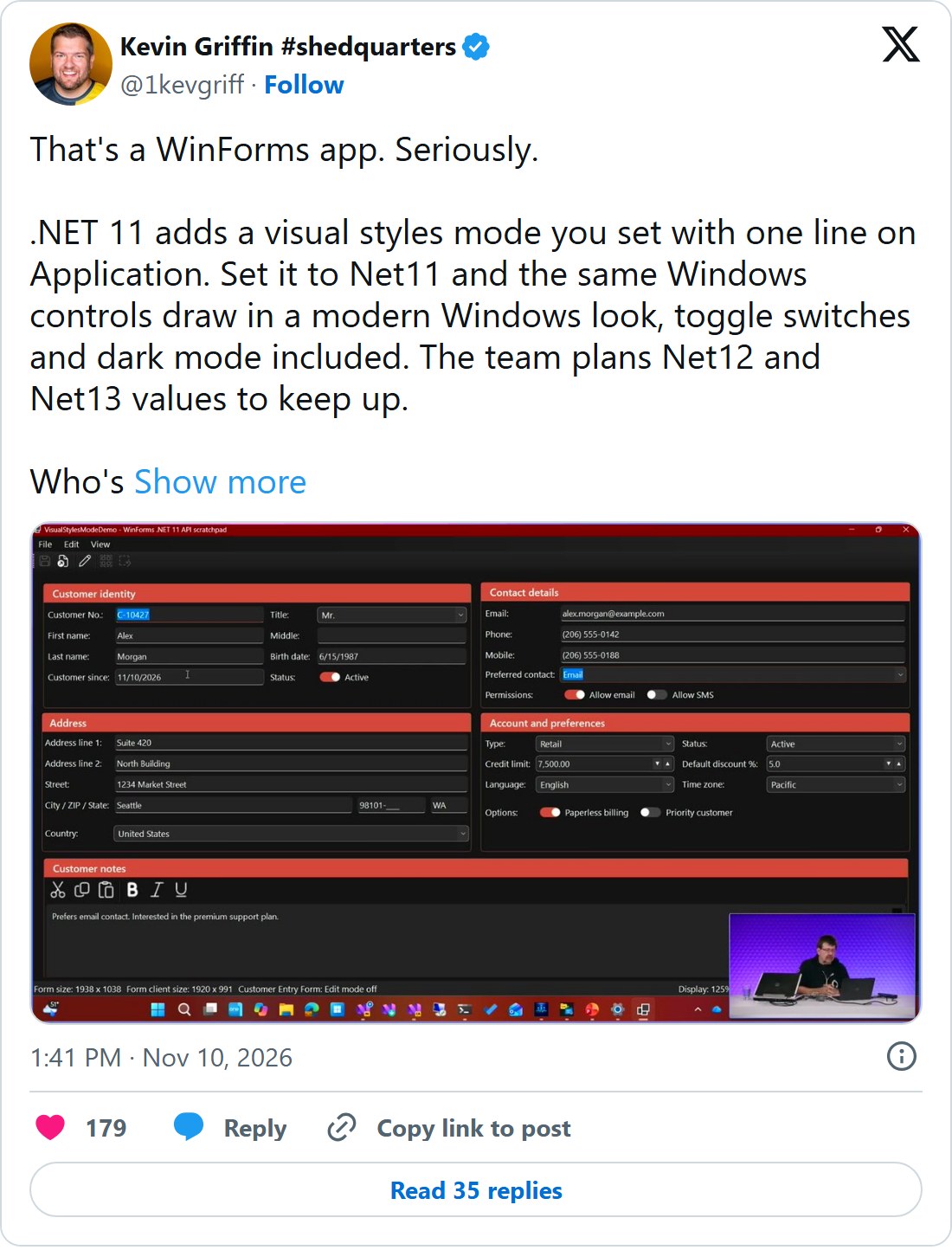
WinForms getting visual styles in .NET 11: 26,418 impressions, 179 likes, 35 replies. A 20+ year old UI framework was the biggest post of the week by a mile.
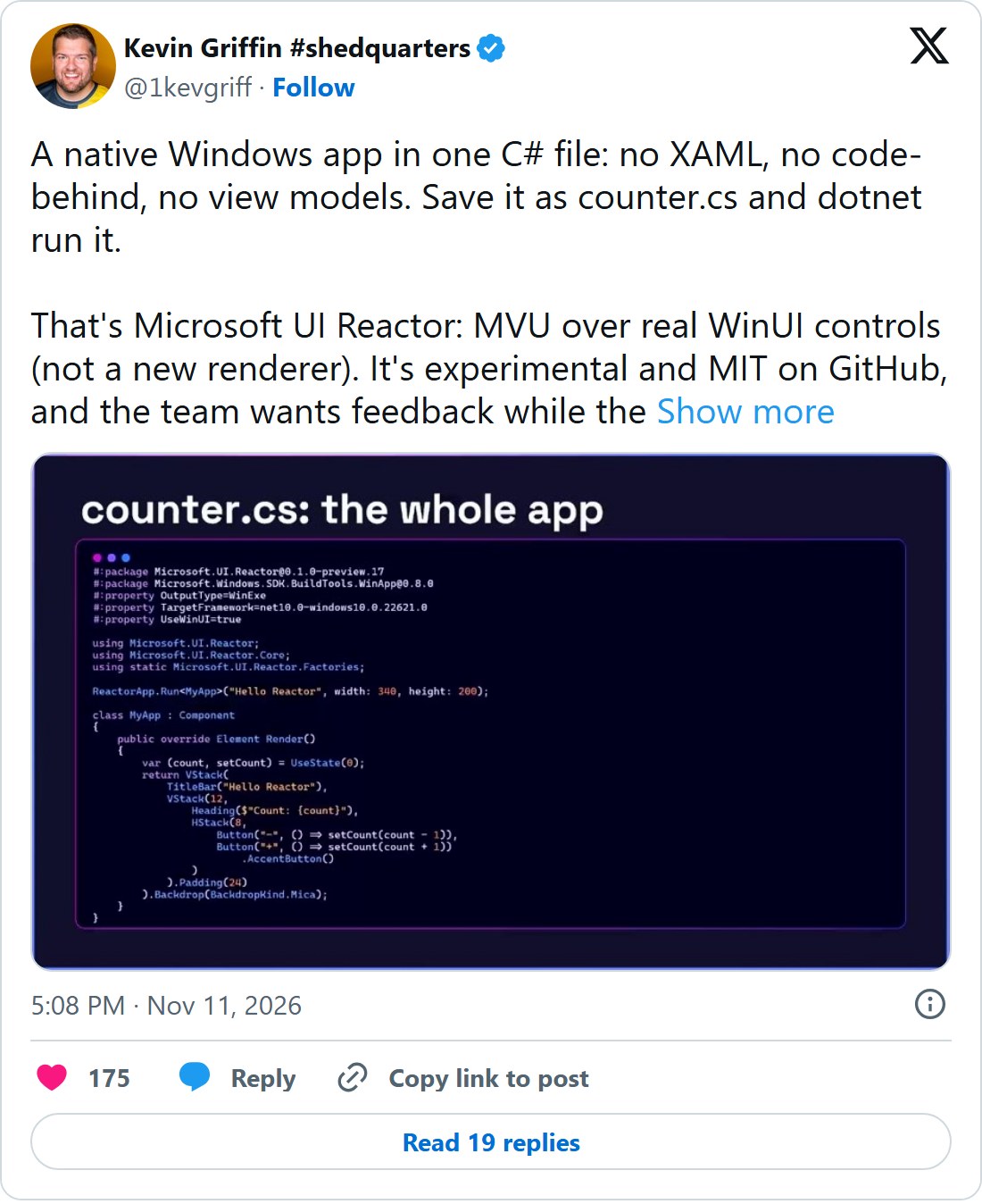
UI Reactor, a full UI app in a single file: 11,017 impressions, 175 likes, 80 bookmarks.
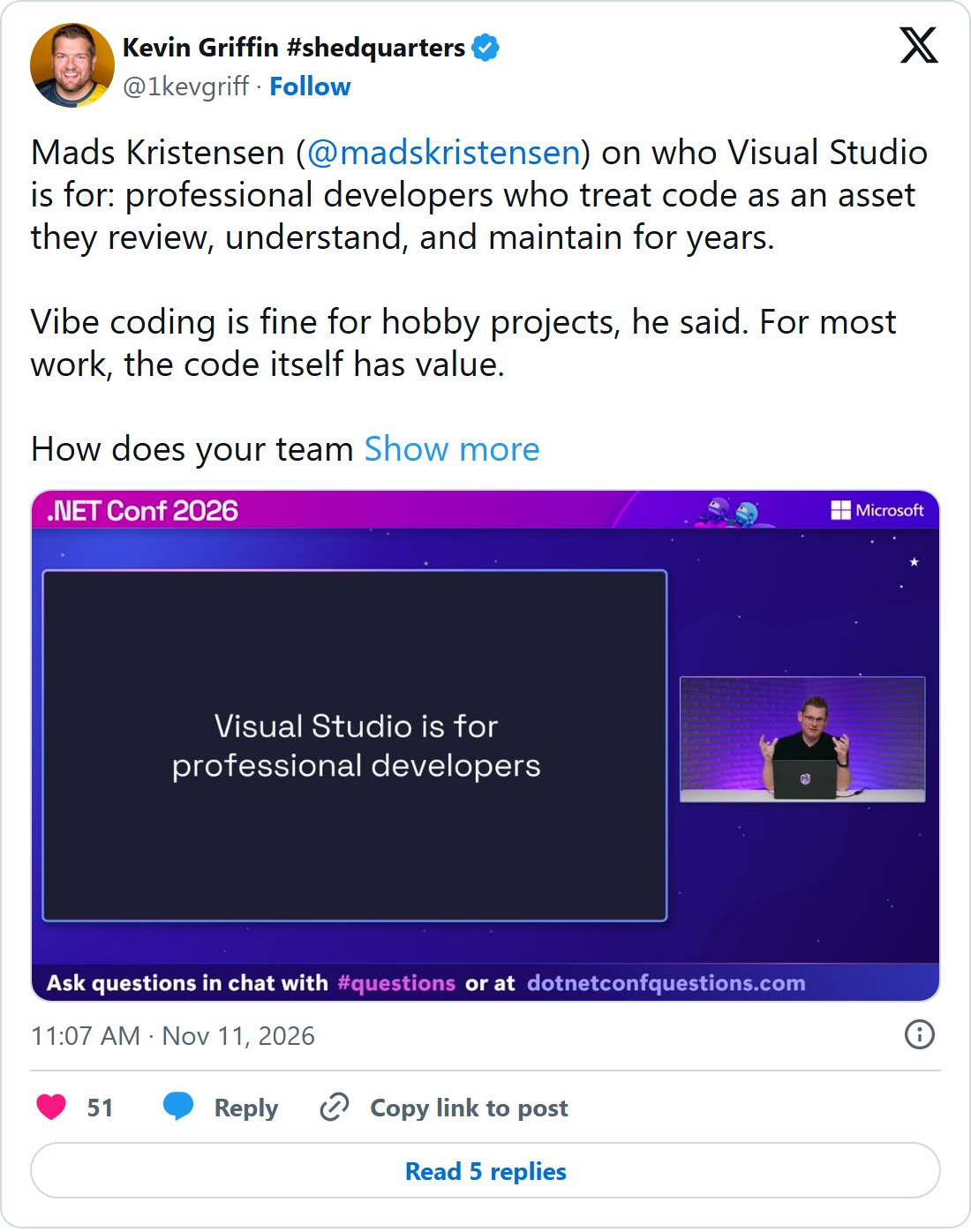
Visual Studio treating code as an asset: 6,655 impressions, and the best argument in my replies.
The keynote’s .NET skills eval dashboard: 6,359 impressions and 105 bookmarks, the most saved post I made.
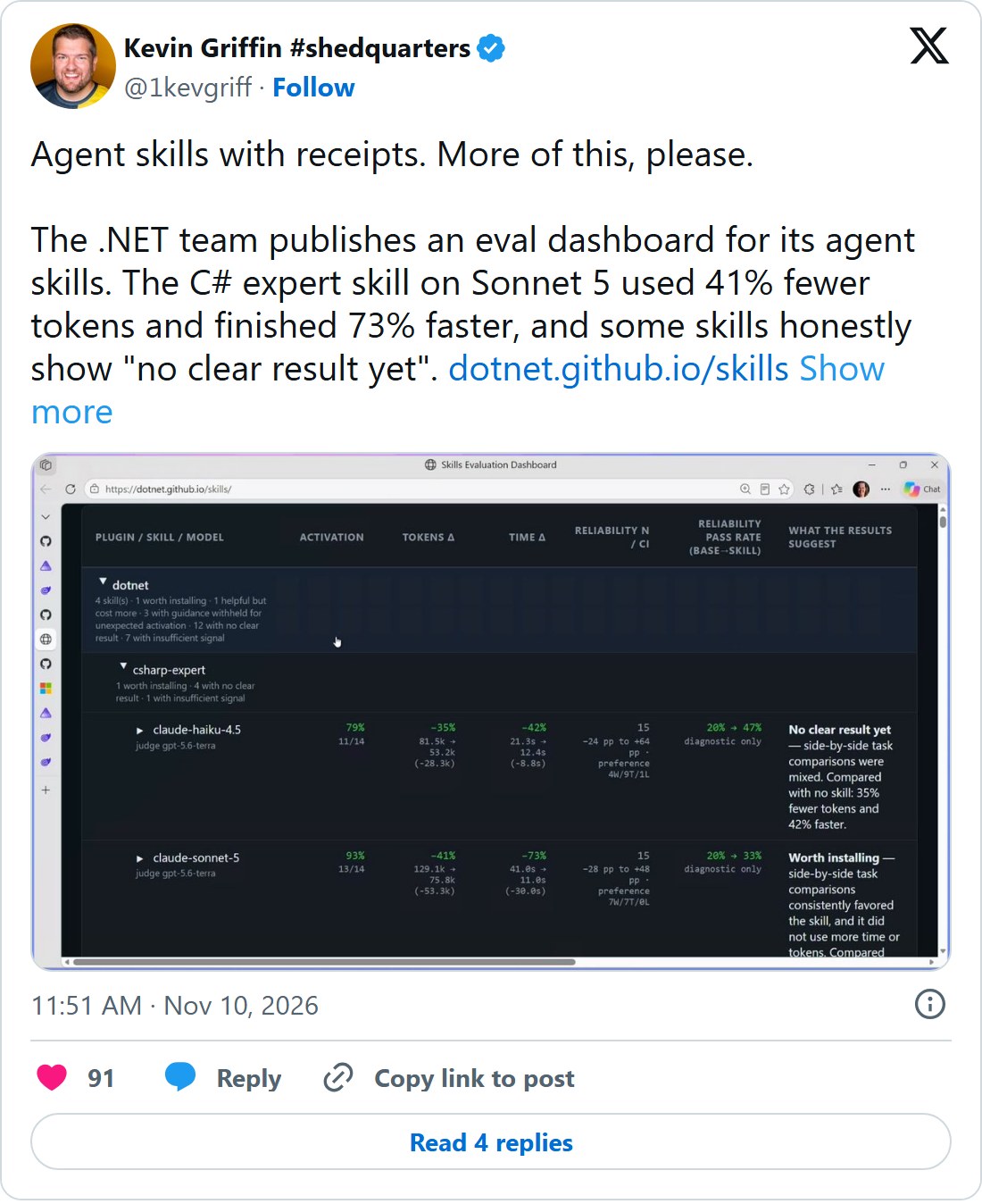
And the stuff I thought would be the headline? The .NET 11 launch post got 144 impressions. One of the C# 15 unions posts got 56. Big announcements get covered by everyone. The specific, slightly unexpected take is what people stop for.
All in all, I think it was an epic success. I now have fully detailed notes with screenshots from the live stream.
One more cool thing: I asked my agent to take the high-level learnings from Day 1 and build a simple slide deck. I took that deck to my local .NET user group, and we talked about everything that happened on Day 1, all from material my bot generated.
Thankfully, I’d watched most of the keynote, so I had some context going in. But if I’d gone in fresh? The speaker notes had everything I needed to BS my way through a simple “what’s new in .NET 11” or C# or whatever.
Would I do this again?
Absolutely.
I think this was a great experiment in gathering data in real time, building notes in real time, and then presenting those notes to the community.
A lot of folks get their information from social media. I’m happy to automate the summaries, but I’m still responsible for what goes out under my name. I think the folks who engaged with my accounts over the last week learned what’s new in the platform.
I even got messages from members of the .NET team saying they loved seeing all the content coming out. As an MVP, I’m just glad I got to do this little part in promoting .NET.
It’s a really exciting time to be a developer, and it’s fun to experiment with all these tools and see what they can do.
So I’d love to know your thoughts. Did you read any of the posts? Have you experimented with something like this in your own work? I’d love to hear more. Let’s talk on X, Bluesky, or LinkedIn.
If you want more on how I use bots for community work, check out Using AI Bots to Help Run Community Conferences.
About Kevin
Kevin Griffin has been running production .NET applications and teaching developers for over two decades. A 17-time Microsoft MVP specializing in ASP.NET Core and Azure, Kevin brings real-world experience from his own SaaS products alongside his consulting work at Swift Kick. He's hosted the Hampton Roads .NET User Group since 2009 and founded RevolutionVA, the nonprofit behind Hampton Roads DevFest. Kevin's talks blend hard-won lessons from production systems with practical advice you can use Monday morning.